

Q
When I export data to a CSV file, it appears as “1.015E+02” etc.
A
This format, which is known as exponential notation, is widely used in scientific calculations.
There is no issue with the data.
Relationship between exponential notation and the corresponding number
means . In other words, it means:
Exponential notation can be converted to numbers in Excel.
Exponential notation can be converted into numbers in Excel as follows:
| Procedure | ||
|---|---|---|
| 1 | Select a cell being displayed in exponential notation. | 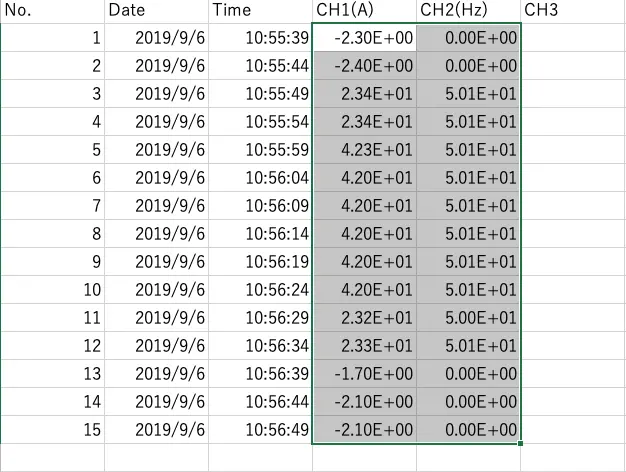 |
| 2 | Right-click the selected cell to display a menu. | ![Click [Format Cells...].](/ja/cross/nextImageExportOptimizer/CSV_Exp_2-opt-1366.WEBP) |
| 3 | The [Category] is set to [Scientific]. Select [Number] and click [OK]. | ![Select [Number] as the [Category].](/ja/cross/nextImageExportOptimizer/CSV_Exp_3-opt-1366.WEBP) |
| 4 | The cell will be converted from scientific notation to a number. | 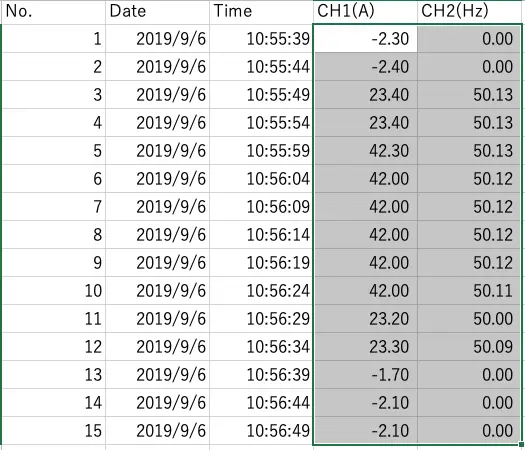 |
Want help or have questions?