HIOKI
GENNECT
Cloud
One
Cross
Top
Applications
Functions
FAQ
Download
Manual
Contact Us
This website uses cookies.
We use cookies to personalise content and ads, to provide social media features and to analyse our traffic. We also share information about your use of our site with our social media, advertising and analytics partners who may combine it with other information that you’ve provided to them or that they’ve collected from your use of their services. You consent to our cookies if you continue to use our website.
Q

Can I load logging data generated by the logging function into Excel?

A

You can export measurement data from GENNECT Cross to a CSV file and then open that file with Excel on a PC.

Exporting measurement data to a CSV file


1

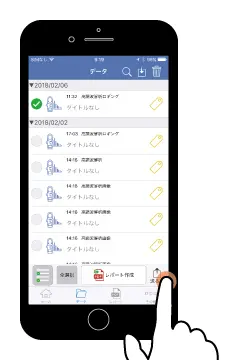
Select the checkbox corresponding to the measurement data in the list that you wish to export and tap the [Send] button.

2

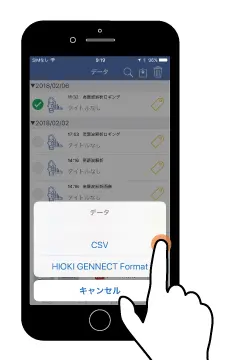
Tap [CSV] to select the CSV file format, which can be opened in Excel.

3

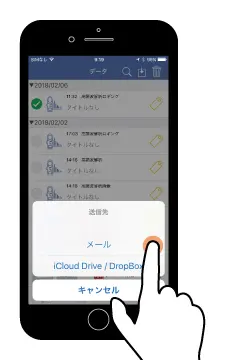
Export the measurement data via email or the cloud.
GENNECT Cross supports the following four export methods:

  • Email
  • Via GENNECT Cloud
  • Via another cloud storage service
  • SD card (Android version only)
Want help or have questions?
HIOKI
Copyright ©2021 HIOKI E.E. CORPORATION
Create new account
Login