

Using GENNECT Cross for the first time
Required equipment
GENNECT Cross supported instruments
A variety of field measuring instruments are supported.
Broadly speaking, supported instruments can be divided into two groups based on their Bluetooth® communications function.
The two types of instruments can be mixed when connecting to GENNECT Cross.
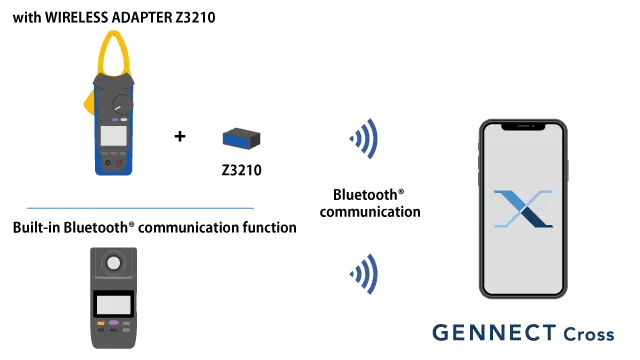
| Models supported by the Wireless Adapter Z3210 | The optional Z3210 can be installed on instruments to enable Bluetooth® communications. Please purchase the Z3210 separately. Instruments can also be purchased as part of a bundle that includes the Z3210. |
|---|---|
| Models with built-in Bluetooth® communications functionality | Instrument has a built-in communications module. |
Smartphone or tablet
GENNECT Cross runs on smartphones and tablets that use iOS or Android OS.
| iOS | iOS 17, 18, 26 iPadOS 17, 18, 26 |
|---|---|
| Android | Android™ 11, 12, 13, 14 |
GENNECT Cloud licenses
To connect to GENNECT cloud, a cloud service operated by Hioki specifically for its GENNECT line of services, please create an account.
Connection method
- Connect the Wireless Adapter Z3210 to the instrument.
A terminal for connecting the Wireless Adapter can be found close to the battery compartment.
In short, it’s easy to install the Wireless Adapter using the same steps as when replacing the batteries.
- Install GENNECT Cross.
Install the app on your smartphone or tablet from the site listed below.

- Connect your instrument to GENNECT Cross.
Connect your instrument to GENNECT Cross using Bluetooth® communications. It’s easy to connect from GENNECT Cross, and no pairing process is required.
For more information, see the online manual.
GENNECT Cross supported instruments
View the list of supported instruments →