

Remote control (on LAN)
- You can control instruments at measurement sites remotely.
- You can change instrument settings and check operating status.

Features
Controlling an instrument at a measurement site from a PC
Instruments on a LAN can be controlled from GENNECT One.
When you activate the remote control function, the instrument’s display screen and control buttons will be displayed in the GENNECT One window.
You can control the instrument as if you were pressing its buttons by clicking the control buttons on the screen.
By using GENNECT Cloud, you can control instruments that are even further away.
When you connect to GENNECT Cloud using GENNECT One’s remote measurement mode, you can remote-control instruments that are connected to the service. Once an instrument has connected to GENNECT Cloud in remote measurement mode, you can control it remotely, regardless of whether it’s located on your LAN.
There are two remote control methods available: remote control from GENNECT Cloud (via a web browser) and remote control from GENNECT One.
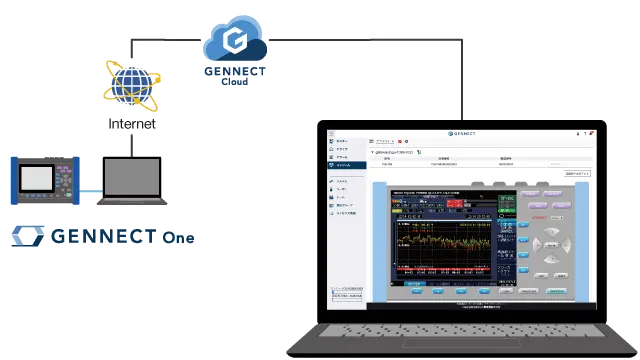
Controlling instruments remotely from GENNECT Cloud (via a web browser)
Log into GENNECT Cloud via a web browser and use its console function.
A list of instruments that you can remote-control will be displayed.
- Instruments connected to GENNECT One that are using remote measurement mode
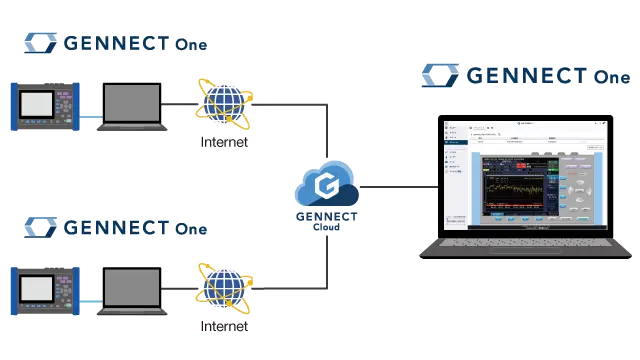
Controlling instruments remotely from GENNECT One
Connect to GENNECT Cloud using GENNECT One’s remote measurement mode. When you do so, all instruments connected to GENNECT Cloud that can be remote-controlled will be displayed in the list of instruments provided by GENNECT One’s remote control function.
The following instruments that can be remote-controlled:
- Instruments connected to GENNECT One that are using remote measurement mode
Supported instruments
View the list of supported instruments →