HIOKI
GENNECT
Cloud
One
Cross
Top
Aplicaciones
Funciones
FAQ
Descargar
Manual
Contacto con nosotros
This website uses cookies.
We use cookies to personalise content and ads, to provide social media features and to analyse our traffic. We also share information about your use of our site with our social media, advertising and analytics partners who may combine it with other information that you’ve provided to them or that they’ve collected from your use of their services. You consent to our cookies if you continue to use our website.

Cerrar la sesión

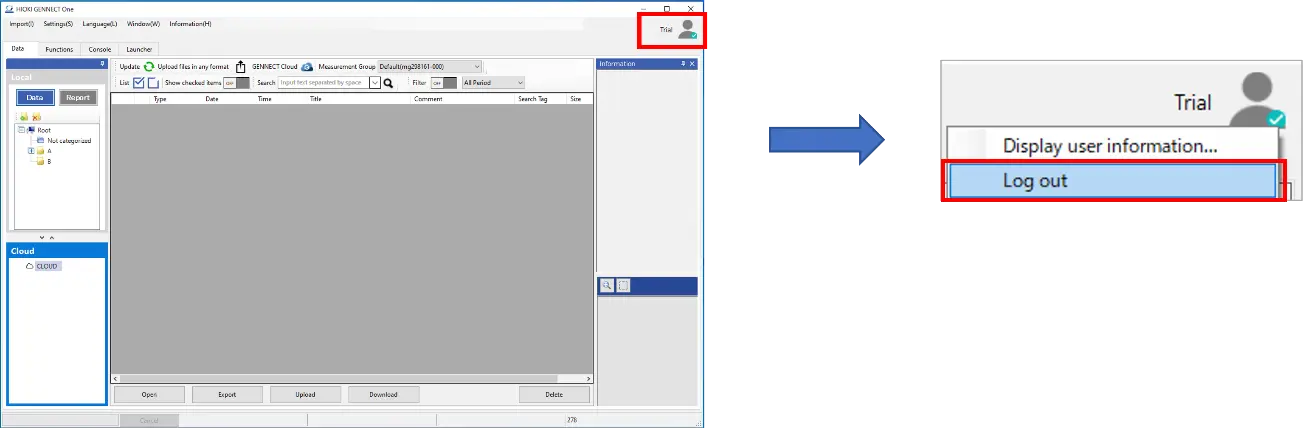
  1. Haga clic en el icono situado en la parte superior derecha de la ventana principal de la aplicación.
  2. Cuando aparezca el menú, haga clic en [Cerrar sesión].
  1. Una vez que haya cerrado la sesión con éxito, se mostrará el mensaje [Se ha cerrado la sesión].
¿Quiere ayuda o tiene preguntas?

Busque en


Índice de contenidos


Crear nueva cuenta
Acceder