

Erstellen eines Berichts (PDF-Datei)
1
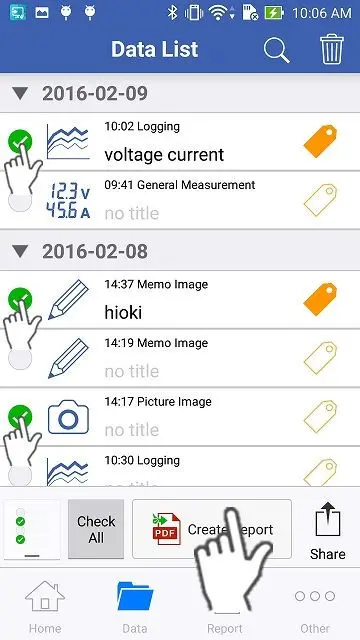
Wählen Sie die Messdaten, Bilder und Notizen aus, die Sie in eine PDF-Datei exportieren möchten, indem Sie auf die Häkchen auf der linken Seite tippen, und tippen Sie dann unten auf die Schaltfläche "Bericht erstellen".
2
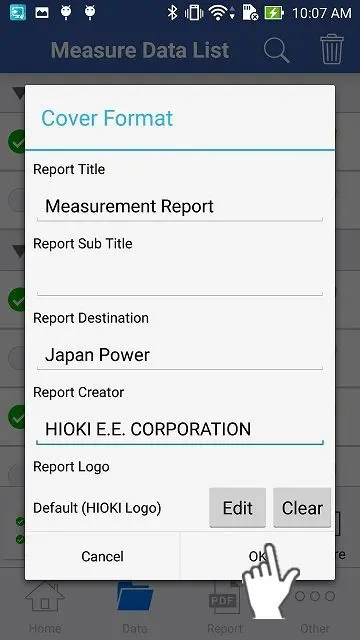
Bitte geben Sie auf der Seite "Umschlagformat" die grundlegenden Informationen für den Bericht ein und tippen Sie auf "OK", dann wird die PDF-Datei automatisch erstellt.
3
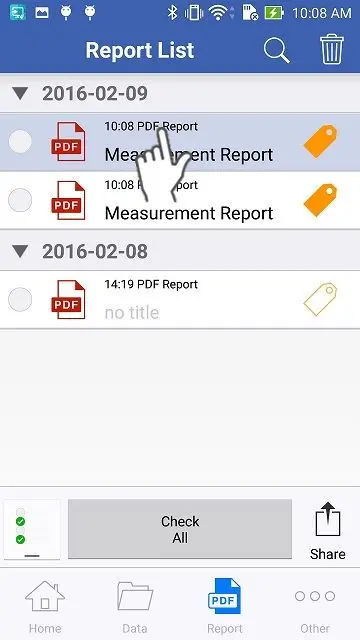
Sie sehen den neu erstellten Bericht hellblau markiert. Bitte tippen Sie ihn an.
4
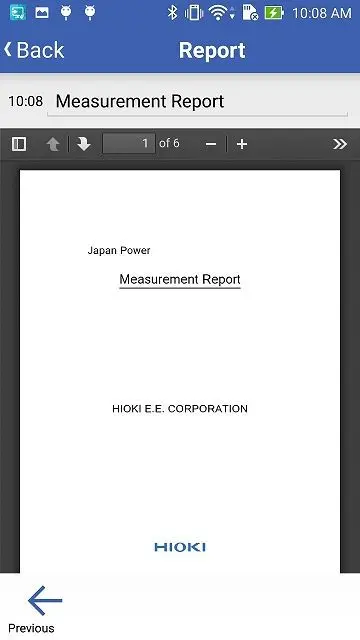
Der Bericht (PDF-Datei) wird angezeigt.
Sie brauchen Hilfe oder haben Fragen?