HIOKI
GENNECT
Cloud
One
Cross
Top
Anwendungen
Funktionen
FAQ
Herunterladen
Handbuch
Kontakt
This website uses cookies.
We use cookies to personalise content and ads, to provide social media features and to analyse our traffic. We also share information about your use of our site with our social media, advertising and analytics partners who may combine it with other information that you’ve provided to them or that they’ve collected from your use of their services. You consent to our cookies if you continue to use our website.

Foto machen

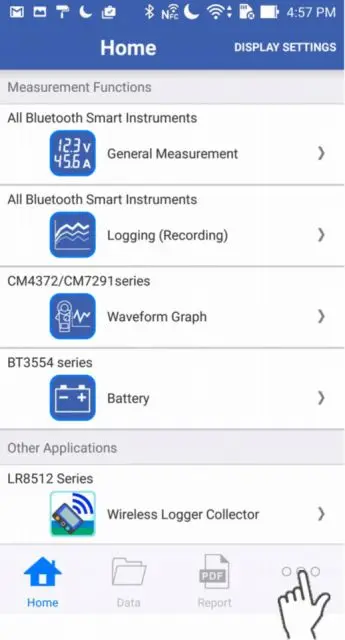
1
Tippen Sie unten rechts auf "Sonstiges".
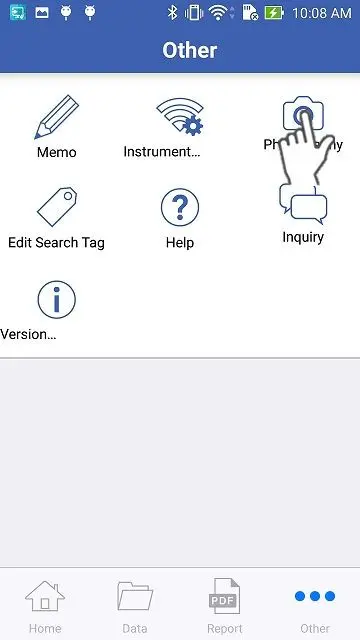
2
Tippen Sie auf die Schaltfläche "Foto aufnehmen".
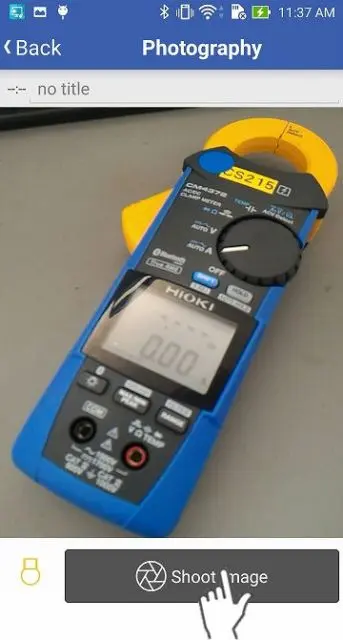
3
Tippen Sie auf die Schaltfläche "Foto aufnehmen" und ein Bild wird in der Datenliste gespeichert.
Wenn Sie ein Smartphone mit Licht verwenden, können Sie es ein- und ausschalten, indem Sie auf die Taste in der unteren linken Ecke tippen.
Sie brauchen Hilfe oder haben Fragen?

Suche


Inhaltsübersicht


Neues Konto erstellen
Anmeldung