

Suche in den Daten
1
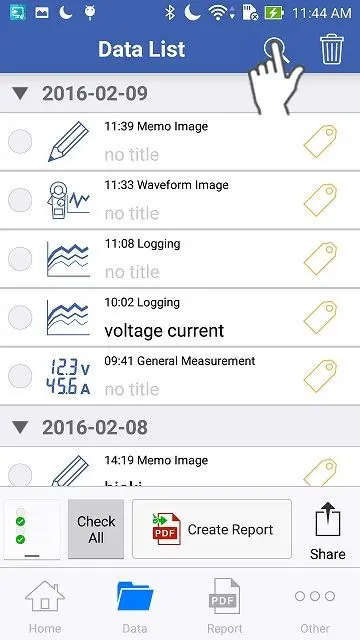
Öffnen Sie die "Datenliste" und tippen Sie auf das Suchsymbol.
2
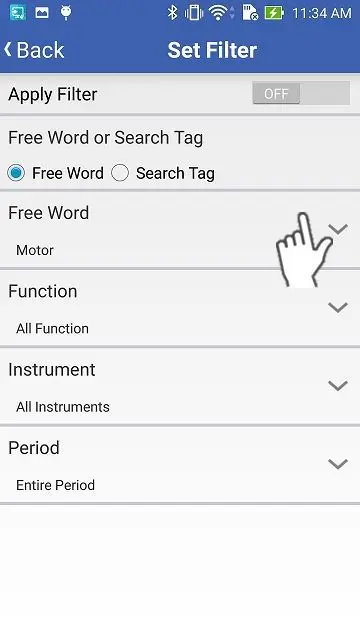
Durchsuchen Sie die Daten mit "Wortsuche" (Titel oder Kommentare) oder "Tag-Suche".
Wenn Sie nach Tags suchen möchten, wählen Sie bitte "Tag Search".
Sie können die Daten nach dem Typ "Funktion", "Instrument" und "Zeitraum" filtern.
Sie können die Daten nach dem Typ "Funktion", "Instrument" und "Zeitraum" filtern.
3
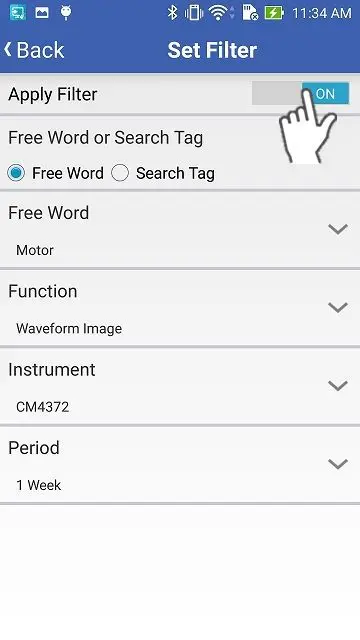
Übernehmen Sie schließlich die Sucheinstellungen und tippen Sie auf "Zurück", um zum Ausgangsbildschirm zurückzukehren.
Sie brauchen Hilfe oder haben Fragen?