

Configurar los ajustes de red
Para utilizar la función de enlace a la nube del LR8450, el propio LR8450 debe estar conectado a Internet.
Este capítulo describe un ejemplo de conexión del LR8450-01 a Internet mediante iPhone tethering.
- Active Compartir Internet en el iPhone.
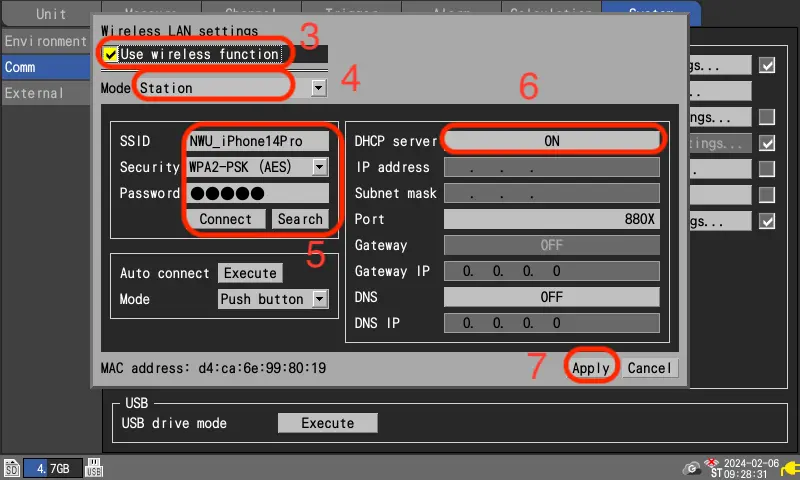
- Abra [System] - [Comm] - [Wireless LAN settings..].
- Marque la casilla [Use wireless function].
- Ajuste el [Mode] a [Station].
- Introduzca el [SSID] y la [Password] que aparecen en el iPhone. En [Security], seleccione [WPA-PSK (AES)]. Pulse [Connect].
- Active la opción [DHCP server].
- Pulse [Apply].
- El LR8450 se reiniciará automáticamente para aplicar los ajustes de red.
- iPhone es una marca registrada de Apple inc.
- La marca iPhone se utiliza bajo licencia de Aiphone Co.
¿Quiere ayuda o tiene preguntas?