

Configurer les paramètres du réseau
Pour utiliser la fonction de liaison au nuage du LR8450, le LR8450 lui-même doit être connecté à Internet.
Ce chapitre décrit un exemple de connexion du LR8450-01 à Internet à l'aide de la fonction d'attache de l'iPhone.
-
Activez le partage d'Internet sur l'iPhone.
-
Ouvrez [System] - [Comm] - [Wireless LAN settings..].
-
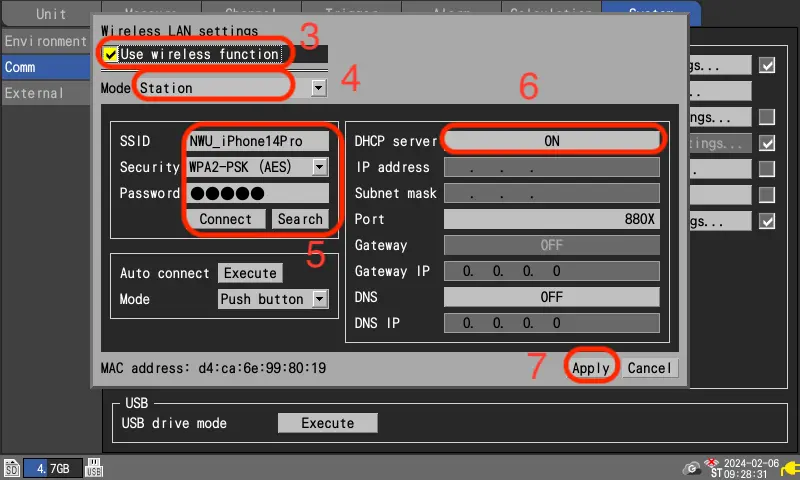
Cochez la case [Use wireless function].
-
Réglez le [Mode] sur [Station].
-
Saisissez le [SSID] et le [Password] affichés sur l'iPhone. Pour [Security], sélectionnez [WPA-PSK (AES)]. Appuyez sur [Connect].
-
Mettez [DHCP server] sur [ON].
-
Appuyez sur [Apply].
-
Le LR8450 redémarre automatiquement pour appliquer les paramètres réseau.
-
Turn on Internet sharing on the iPhone.
-
Open [System] - [Comm] - [Wireless LAN settings..].
-
Check the [Use wireless function] check box.
-
Set the [Mode] to [Station].
-
Enter the [SSID] and [Password] displayed on the iPhone.
For [Security], select [WPA-PSK (AES)].
Press [Connect]. -
Turn [DHCP server] to [ON].
-
Press [Apply].
-
The LR8450 will automatically reboot to apply the network settings.
- iPhone est une marque déposée d'Apple inc.
- La marque iPhone est utilisée sous licence par Aiphone Co.