

Using Remote monitoring mode
Overview
Remote monitoring mode allows you to access instruments connected to a computer from a remote location using GENNECT Cloud.
For details about GENNECT Cloud functionality, please see the GENNECT Cloud online help.
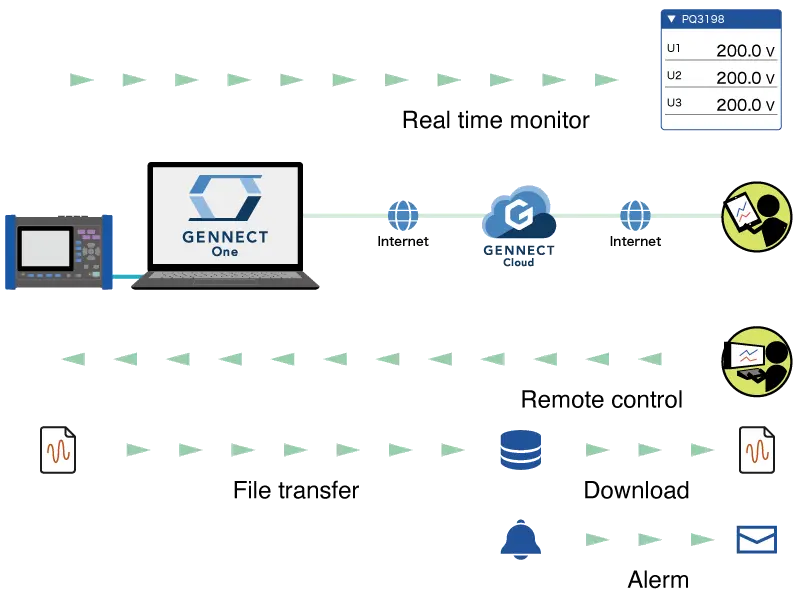
Real-time monitor
The real-time monitor saves measured values for channels selected from instruments’ measurement parameters to the cloud server. The measurement interval is fixed at 1 min.
This manual refers to data saved in this manner as GENNECT acquisition data.
- Measured values updated in real time can be reviewed in a web browser.
- You can select a channel and interval and graph associated measured value. Values from multiple instrument models can be grouped together in a single graph.
- Measured values can be downloaded in the CSV format.
Remote control
Remote control functionality allows you to operate an instrument safely from a remote location by using its built-in HTTP server function.
Transferring and downloading files
Measurement data files that are saved on an instrument can be transferred automatically to a local computer.
Files transferred to a computer can be remotely acquired via the cloud. This manual refers to such measurement data as instrument data files.
When using this function, the instrument settings are changed for file transfer. See below for details.
* It takes about 7 minutes until the instrument data file transferred from the instrument is available for acquisition.
Alarm
Alarm notifications are generated when GENNECT acquisition data satisfies alarm conditions and when instrument data files are uploaded.
Notification methods include Slack, GENNECT Cross, and web application displays.
Supported Instruments
| Model | Name | Firmware version |
|---|---|---|
| PQ3100 | Power Quality Analyzer | Ver. 2.30 or later |
| PQ3198 | Power Quality Analyzer | Ver. 2.00 or later |
| PW3335 | Power Meter | Ver. 1.11 or later |
| PW3336 | Power Meter | Ver. 1.23 or later |
| PW3337 | Power Meter | Ver. 1.23 or later |
| PW3360 | Clamp On Power Logger | Ver. 3.21 or later |
| PW3365 | Clamp On Power Logger | Ver. 2.10 or later |
| PW3390 | Power Quality Analyzer | Ver. 2.00 or later |
| PW6001 | Power Quality Analyzer | Ver. 3.02 or later |
| PW8001 | Power Quality Analyzer | Ver. 1.00 or later |
| LR8450, LR8450-01 | Memory HiLogger | Ver. 1.50 or later |
| MR6000 | Memory HiCorder | Ver. 3.11 or later |
| MR8875 | Memory HiCorder | Ver. 2.17 or later |