

Obtaining a New Password
An email including a link for obtaining a new password will be sent to the email address you registered with GENNECT Cloud. You can set a new password by following the URL for obtaining a new password.
* To obtain a new password for a user who has not registered an email address, please contact your account administrator.
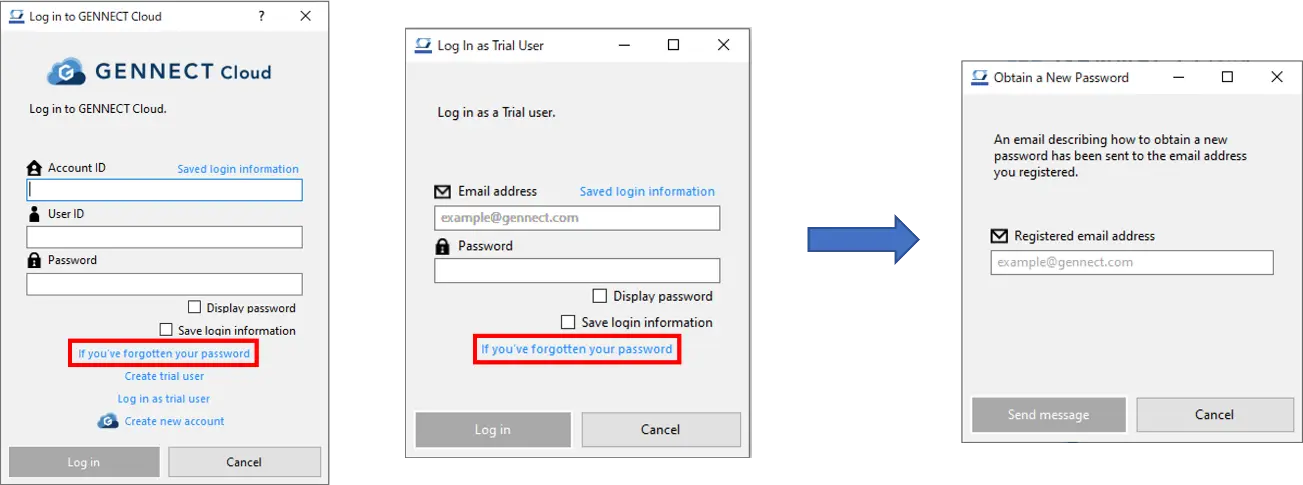
- Click [If you’ve forgotten your password] on the [Log in to GENNECT Cloud] or [Log in as trial user] window.
- When the [Obtaining a new password] window opens, enter the email address you registered and click [Send message].
- The message will be sent to the email address you entered. Follow the instructions on the web page accessed via the URL in the email to set a new password.
Want help or have questions?