

Configure the battery function
1
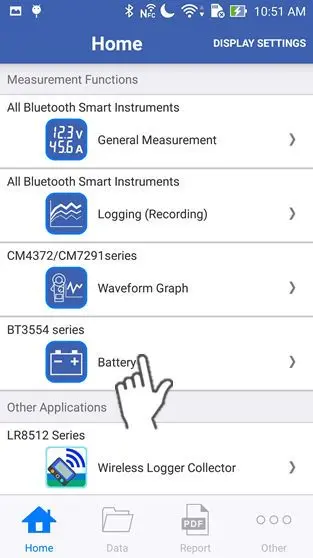
Tap "Battery" on the home screen.
If you cannot find an instrument which can utilize the "Battery" function, please refer to Add other measurement instruments to proceed with this function.
2
Wait up to 30 seconds until you find the instrument on the "Select Instrument" screen, then select the one which you would like to measure a battery with.
If the instrument hasn't connected after 1 minute, please refer to 「I can’t connect to GENNECT Cross」
If you tap "Start Procedure offline", the function starts without a bluetooth connection. In this mode, only the "Threshold Table" function in the maintenance menu and the setting menu are available.
If you tap "Start Procedure offline", the function starts without a bluetooth connection. In this mode, only the "Threshold Table" function in the maintenance menu and the setting menu are available.

3
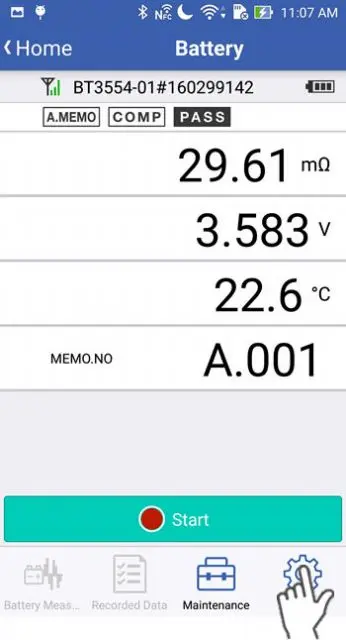
Tap the "Settings" icon on the screen.
4
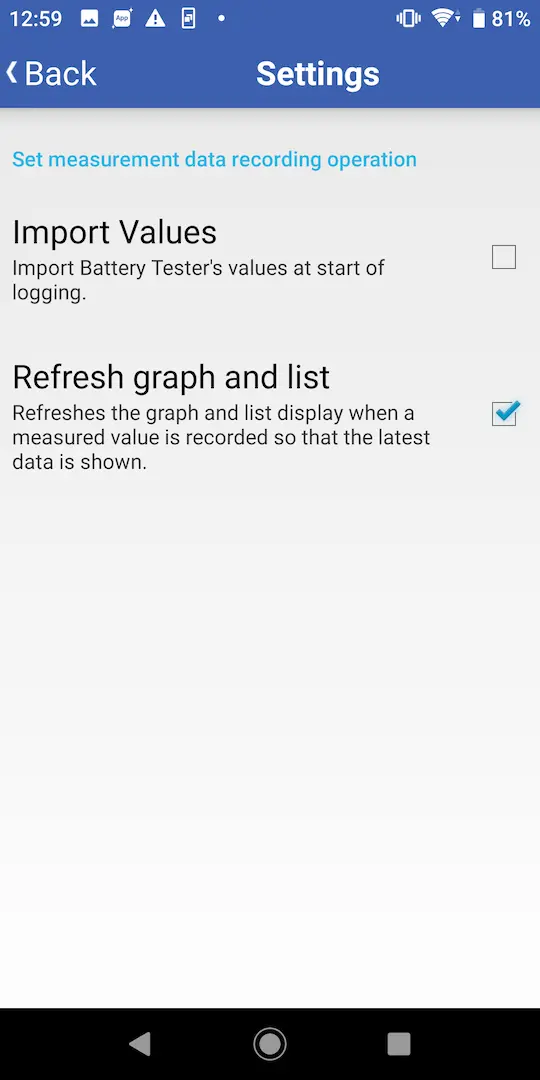
To choose the settings on the battery function, tap a checkmark in the appropriate box.
Import Values
on: Enables the setting to pre-load all the data of the selected memory unit from the battery tester before recording starts.
off: Disables the setting to pre-load all the data of the selected memory unit from the battery tester before recording starts.
Refresh graph and list
on: Updates the display so that the latest data is displayed on the screen when the measured value is updated by the battery tester.
off: When the measured value is updated by the battery tester, the display is not updated so that the latest data is displayed.
on: Enables the setting to pre-load all the data of the selected memory unit from the battery tester before recording starts.
off: Disables the setting to pre-load all the data of the selected memory unit from the battery tester before recording starts.
Refresh graph and list
on: Updates the display so that the latest data is displayed on the screen when the measured value is updated by the battery tester.
off: When the measured value is updated by the battery tester, the display is not updated so that the latest data is displayed.
Want help or have questions?