HIOKI
GENNECT
Cloud
One
Cross
Top
Applications
Functions
FAQ
Download
Manual
Contact Us
This website uses cookies.
We use cookies to personalise content and ads, to provide social media features and to analyse our traffic. We also share information about your use of our site with our social media, advertising and analytics partners who may combine it with other information that you’ve provided to them or that they’ve collected from your use of their services. You consent to our cookies if you continue to use our website.

Use the inter-channel operation

1
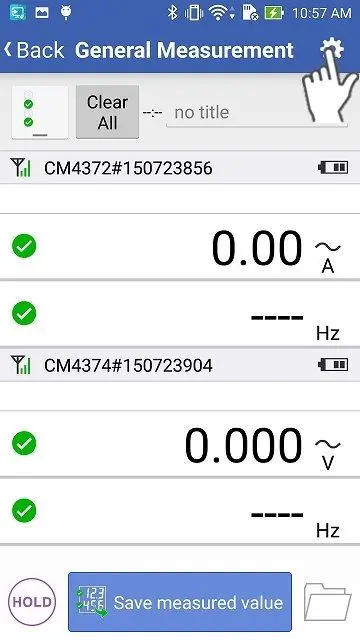
Open the "General Measurement" screen and tap the settings icon.
2
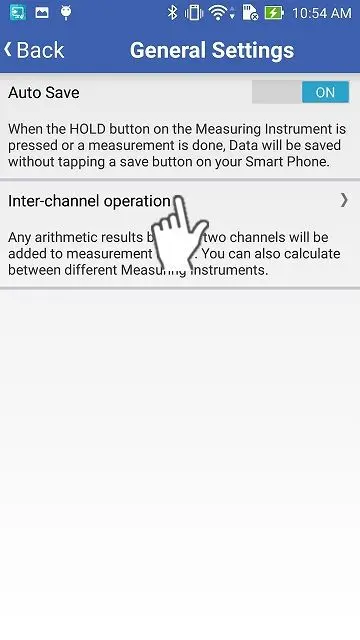
On the "General Settings" screen, tap the "Inter-channel operation"
The "Inter-channel operation" function will not show up on the screen, if you have not connected instruments which can utilize this function.
3
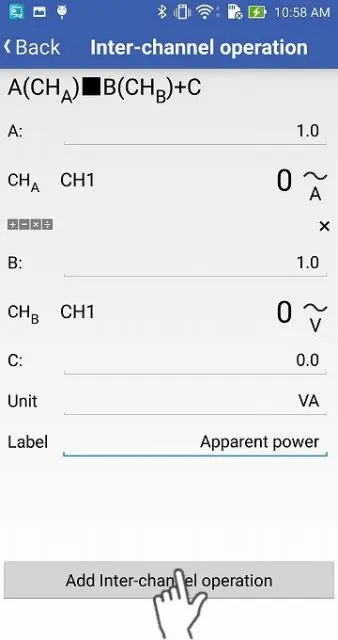
After setting channels, coefficients, an offset, a unit and a name, then tap "Add inter-channel operation".
Example: AC current x AC voltage = Apparent power
4
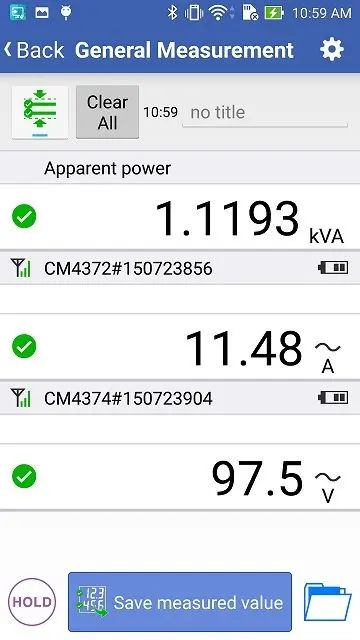
The value of the inter-channel operation will be added on the top.
Want help or have questions?

Search


Table of contents


Create new account
Login