

Get the inrush current waveform
When you use the inrush current function on the CM4372/CM4374, it automatically saves the waveform and measured values on the internal memory. You can import this data to your smartphone by using the "Waveform/FFT" function. (You don't need the Bluetooth connection with a smartphone during inrush current measurement.)
1
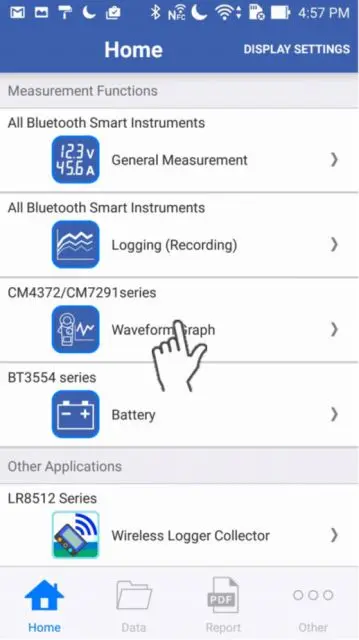
Tap the "Waveform/FFT" function on the home screen.
If you cannot find an instrument which can utilize the "Waveform/FFT" function, please refer to Add other measurement instruments to proceed with this function.
2
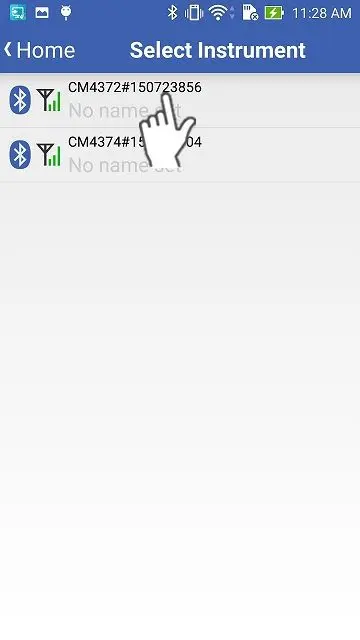
Wait up to 30 seconds until you find the instrument on the "Select Instrument" screen, then select the one which you would like to import the inrush current data from.
If the instrument has not connected after 1 minute, please refer to 「I can’t connect to GENNECT Cross」.
3
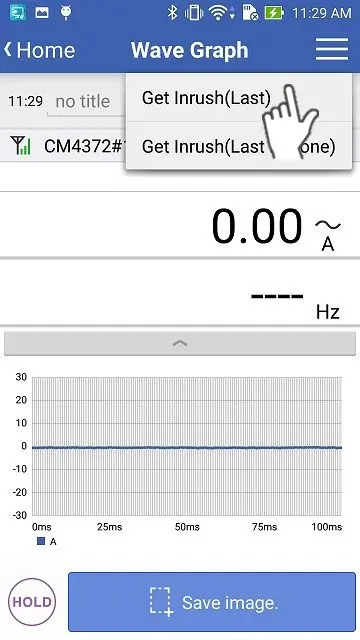
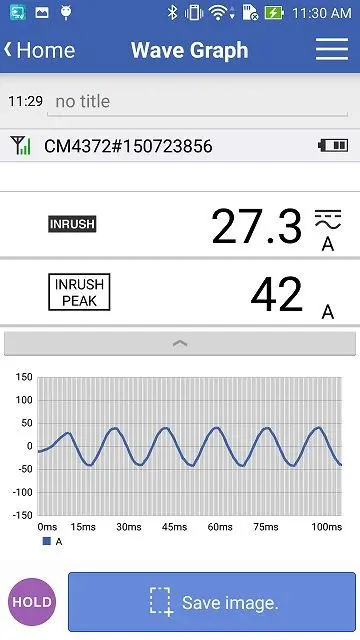
Tap the menu on the top right corner and get the data you would like to import (the "Latest" or the "Previous" one).
You cannot get the data when the inrush current data is not saved on the internal memory of the measuring instrument.
When you would like to go back to the "Waveform/FFT" function, tap the "HOLD" button.
When you would like to go back to the "Waveform/FFT" function, tap the "HOLD" button.
Want help or have questions?