

Logging (Auto recording)
You can automatically record the data up to a maximum of 24 hours, with the fastest inverval of every 5 seconds and up to 8 channels simultaneously. This function allows you to record the data trend graph during a assigned period.
Please do not hide the GENNECT Cross App to the background by pressing the home button of your smartphone, the data cannot be recorded correctly.
1
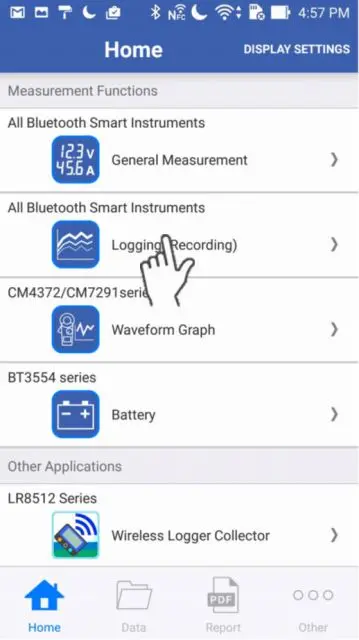
Go to the Home screen, then select the "Logging".
2
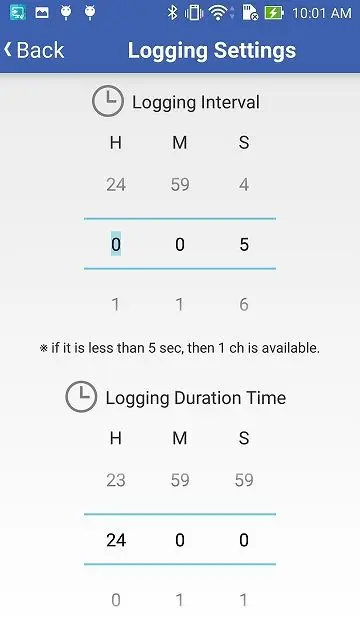
Please tap the "Settings" icon on the top right conrner, then you can change the logging interval and logging duration time.
You can select 1 second interval when you log only one channel.
3
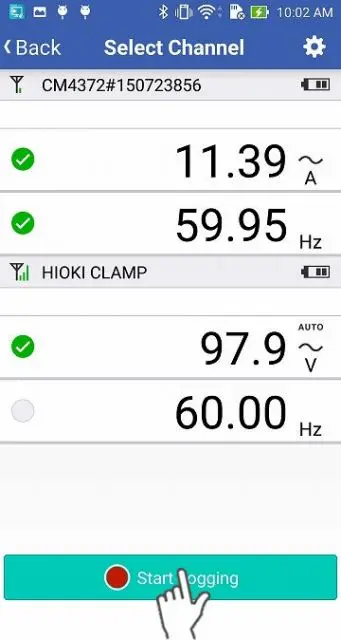
Please go back to the "Select Channel" screen. Select the channels you would like to record (up to 8 channels). Next tap the "Start Logging" button.
If you don't get the readings, please wait up to 30 seconds until you get them.
If the instrument hasn't connected after 1 minute, please refer to 「I can’t connect to GENNECT Cross」.
If the instrument hasn't connected after 1 minute, please refer to 「I can’t connect to GENNECT Cross」.
4
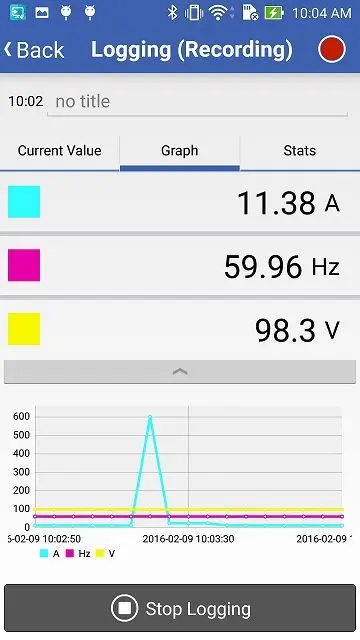
Once the logging duration time has passed or you tap the "Stop Logging" button, the logging (auto recording) will be stopped.
If you tap the red circle button on the top right corner, then you can check the logging settings.
Want help or have questions?