

Editing a measurement group
Displaying the measurement group editing screen
Click [Details] for the measurement group you wish to edit on the measurement group screen. Then click [Edit].
Editing the measurement group name, assigned users, and assigned teams
Edit the field and then click [Update]. For more information about available fields, see “Registering a new measurement group.”
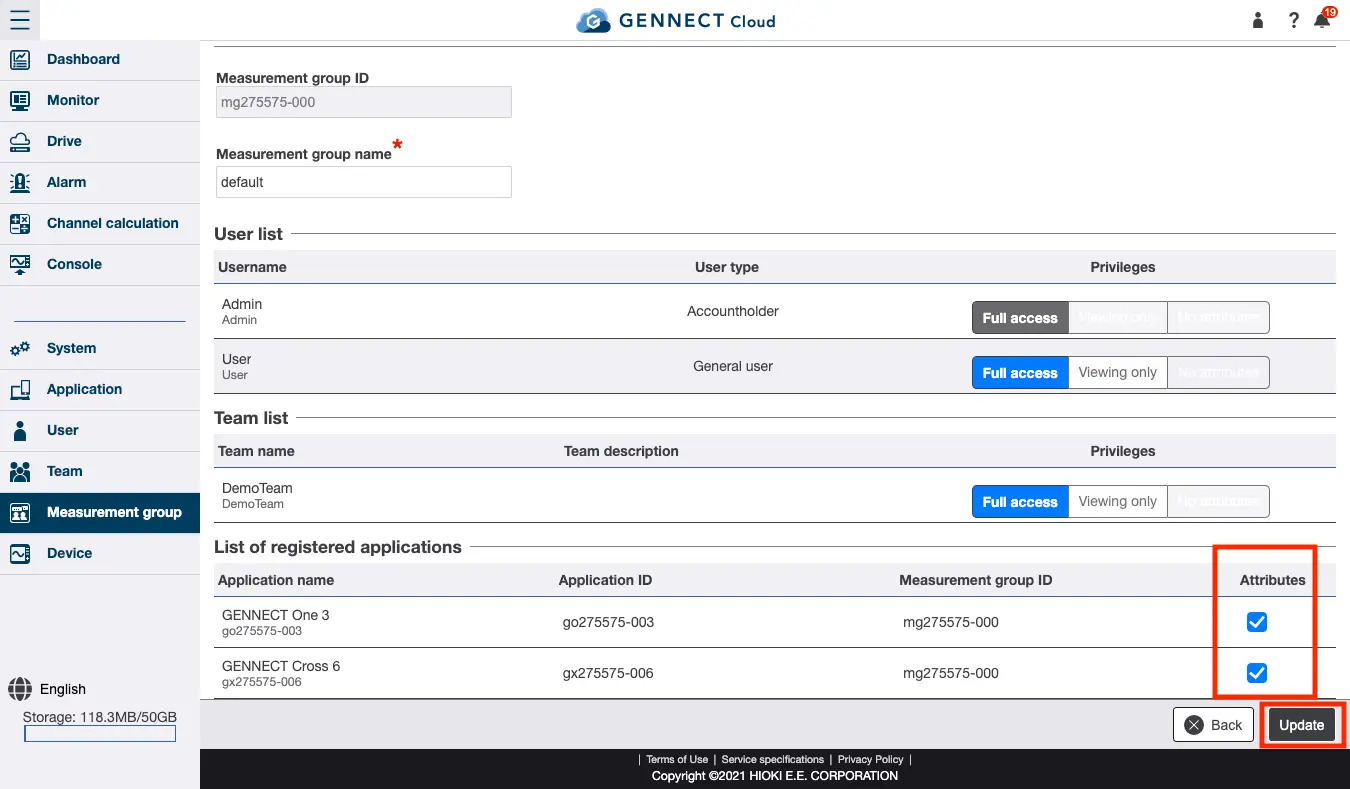
Assigning a gateway/application to a measurement group
Select the checkbox of the gateway/application you wish to assign to the current measurement group on the [Registered gateway list] and click [Update].
**Exercise care when handling data as gateways/applications cannot simultaneously belong to multiple measurement groups. Additionally, GENNECT polled channel selections for gateways/applications are saved for each measurement group. After changing a gateway/application’s measurement group, reselect its GENNECT polled channels as necessary. **
Example operation: A gateway belongs to measurement group A, and an LR8450’s UNIT1_CH1 is selected as the GENNECT polled channel for the gateway.
The gateway is moved from group A to new measurement group B at 12:00 am on January 27, 2020, and UNIT1_CH1 is reselected.
At that point, GENNECT polled data from before 12:00 am on January 27, 2022, will belong to measurement group A, while subsequent data will belong to measurement group B. Once GENNECT polled data has been recorded, it cannot be moved to another measurement group.